Petro Path
- 4.0
- Rating
- 10.00K
- Installs
- Free
- Price

 Analysis by App-foxy
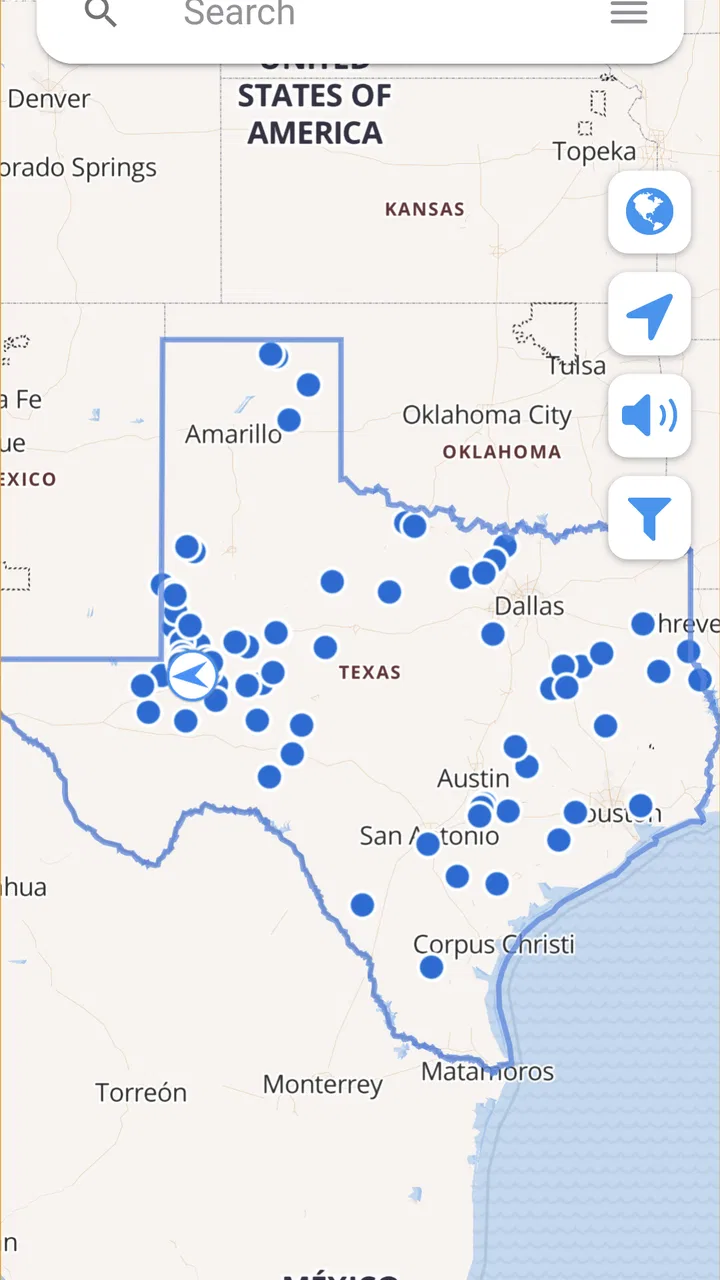
If you work around oil and gas wells, the difference between knowing a location and actually reaching it can be surprisingly large. A well name may be familiar, yet the practical question is usually more urgent: where is it, how do I get there, and can I send the details to someone else without rebuilding the search from scratch? Petro Path is a business app from Petro Path that focuses on that narrow, useful problem. I found it most interesting not as a general mapping replacement, but as a field-oriented tool for finding, organizing, and sharing well directions.
The app is free to install and is rated for Everyone, which makes it easy to try without committing money upfront. Its current version is 4.9.5, and it runs on Android devices using version 5.0 or later. There are optional in-app purchases ranging from around two dollars to around twenty dollars per item, so I would still check the purchase screen before relying on any paid capability for a team workflow.
What I would judge before making Petro Path part of a field routine
My first decision criterion would be the kind of location work you actually do. If your day involves oilfield or gas-well addresses, repeated searches, and sending directions to drivers or coworkers, this app has a clear purpose. If you only need ordinary turn-by-turn navigation for familiar roads, a standard maps app will probably feel more natural and may already cover your needs.
You May Also Like

 AccuWeather: Weather Radar
AccuWeather Review: A Quick, Clear Forecast for Everyday Decisions
For everyday plans, the best forecast is the one you can understand quickly. AccuWeather makes rain timing, radar, and local conditions easy to act on, with a few trade-offs.

 Hill Climb Racing
Why Hill Climb Racing Still Turns Crashes Into One More Run
A tiny car, a bumpy hill and one more upgrade: Hill Climb Racing keeps resurfacing because its simple chaos makes every near-miss feel personal.

 AliExpress - Shopping App
AliExpress Makes Global Shopping Feel Personal, but Shoppers Bear the Risk
AliExpress turns a global marketplace into a pocket-sized discovery engine. Its reach is useful, its shopping loop compelling, and its trade-offs easy to miss.

 Lords Mobile: Kingdom Wars
Lords Mobile Is a Kingdom-Building Routine, Not a Quick Match
A case-by-case verdict on the building, battles, device demands, and social commitments that make Lords Mobile rewarding for some players and exhausting for others.

 PDF Scanner app - TapScanner
TapScanner Makes Paperwork Easier to Capture, Check, and Share
TapScanner makes scanning with a phone feel less like a rescue operation and more like a dependable step in getting work done. Its capture tools are useful, though not flawless.

 Block Blast!
Block Blast! Shows How Much a Puzzle Game Can Leave Out
A quiet grid game shows why puzzle players increasingly value instant clarity, repeatable skill and low-pressure play—and where the genre still needs to catch up.
More From Our News Desk
View All News


The second criterion is how much preparation your work requires. A general maps service is excellent when you already know the destination or can search a recognizable street address. Well locations are often less convenient. They may be identified by names, local references, or industry-specific information rather than the sort of address a consumer navigation app handles gracefully. Petro Path is built around that search problem, which gives it a more practical starting point for field users.
I would also consider the handoff between office and field. A useful well-location workflow rarely ends when one person finds the point. Someone may need to share it with a contractor, save it for a later visit, or return to it during another inspection. The ability to search, share, and save is therefore more important here than a polished set of general travel features. Those actions make the app relevant to dispatchers, landmen, service crews, inspectors, and anyone who revisits the same operating area.
There is another decision that is easy to overlook: whether the app complements or replaces your existing navigation setup. I would not approach Petro Path expecting it to be the only tool in the vehicle. I see it more as the place where I locate and organize the well, followed by whatever navigation method is most dependable for the actual drive. That distinction avoids an unrealistic comparison with full-featured consumer mapping platforms.
How the search-and-share workflow helps in practice
The most useful everyday scenario is a last-minute field request. Imagine a supervisor sends a message asking you to visit a particular well before the end of the day. Instead of searching a general map, checking several similar names, and manually copying a location into a message, I would use Petro Path to look up the well, confirm that I had the intended result, save it if the visit might happen again, and share the destination with the driver or technician.
That workflow matters because it separates the work into sensible steps. Search is for finding the location, saving is for reducing repeat effort, and sharing is for moving the result to another person. In a busy operation, that is more valuable than having every possible map feature in one place. It also reduces the chance that a colleague receives a vague description such as “the well near the old lease road” instead of a usable destination.
A less obvious benefit is consistency. When several people handle the same group of wells, saved locations can become a personal reference system rather than a collection of scattered text messages. I would use descriptive notes or naming habits outside the app when necessary, but the central idea remains useful: find a location once, then make the next visit easier. That is particularly helpful for seasonal inspections, maintenance rounds, and follow-up work where the same sites return to the schedule.
Sharing also changes who can benefit from the app. The person doing the research does not necessarily have to be the person driving. An office coordinator can locate a destination and pass it to a field employee, while a technician can send a discovered location back to the office for future planning. This makes Petro Path relevant to small teams that do not have a dedicated mapping system.
Where Petro Path is stronger than a normal maps search
Petro Path wins when the starting point is an oilfield or gas-well location rather than a conventional destination. That specialization is its main reason to exist. A broad consumer map tries to serve restaurants, shops, homes, roads, and public places. Petro Path is aimed at a narrower professional task, so the interface and workflow can be judged by how quickly it gets a field user from a well reference to a shareable destination.
I also like the combination of search and saving. A general map may let you bookmark places, but the surrounding experience is usually designed for everyday travel. Here, saving has a more operational purpose. I would build a small working set of frequently visited wells, then use that set to prepare a route or respond quickly when a location comes up again. The practical gain is not dramatic after one search; it becomes more noticeable after repeated visits.
The app’s share function is another strong point for teams. A location is useful only if it can move cleanly between people and tools. Before a trip, I would send the destination to the person responsible for driving and keep the original well reference in the message as a cross-check. That simple habit is important because a coordinate or map pin without context can still create confusion when several nearby wells have similar identifiers.
Petro Path also has a useful role in the early planning stage. I could search several wells before leaving, save the ones that belong to the day’s work, and then decide how to handle the driving separately. That is a better fit for a technician preparing a visit list than opening a general navigation app and searching each destination only when the vehicle is already moving.
Its audience appears to appreciate that focus: the app has an average rating of 4.0 from around 160 ratings, with more than 70 written reviews and over 10 thousand installs. Those figures suggest a modest but real user base rather than a mainstream navigation audience. I would interpret that as evidence of a specific niche, not as a reason to expect the same polish or breadth as the largest mapping services.
Practical habits that make the app more useful
My first tip is to prepare before the trip rather than search while parked at the gate. Search for the wells you expect to visit, save the important ones, and share the destinations before leaving reliable connectivity. This turns the app into a planning tool instead of an emergency lookup tool. It also gives you a chance to catch a wrong match while there is still time to ask someone in the office.
My second tip is to keep the well identity visible when sharing. Even if the recipient receives a usable location, include the original well name or reference in the surrounding message. That creates a human check against mistakes, especially when multiple sites are close together. Petro Path can help with the location handoff, but good field communication still depends on giving the recipient enough context.
Third, I would treat saved locations as a working list, not as a substitute for an official company record. A saved point is convenient for personal repeat visits, but operational records may need ownership details, inspection history, access instructions, or other information that a location-focused app is not designed to manage. This distinction prevents the app from being asked to do the job of a full asset-management system.
Finally, I would test the complete workflow with one colleague. Search for a representative well, save it, share it, and ask the other person to open the result and identify the intended destination. That small trial reveals more than simply installing the app because it checks the part that matters most: whether the location remains understandable after it leaves your phone.
When another type of app may be a better fit
Petro Path is not automatically the best choice for every field worker. If your main need is live traffic, public transit, walking directions, business discovery, or detailed road guidance, a mainstream navigation app is likely the better primary tool. Those services are built around the journey itself, while Petro Path is more valuable at the point where a well must be identified and passed along.
I would also look elsewhere if your team needs a shared operational database. A dedicated asset-management or field-service platform may be preferable when several employees must edit records, track work orders, attach documents, record inspection results, or maintain formal histories. Petro Path can support the location part of that process, but a company with broader reporting requirements should not confuse a focused well-direction app with a complete business system.
There is a similar trade-off for users who work mostly offline or in areas with unreliable service. I would prepare searches and saved locations before entering a weak-coverage area, but I would not assume that preparation solves every connectivity issue. The safest approach is to test the app in the same conditions as the job and keep a practical backup for critical destinations. In remote work, one app should not be the only plan for reaching a high-priority site.
New users may also need patience during the first few sessions. Specialized tools can feel less immediately familiar than a general map because their value comes from a particular workflow rather than a broad collection of consumer features. I would spend a short amount of time learning how search results, saved places, and sharing fit together. That learning cost is reasonable for regular well work, but probably not worthwhile for someone who only needs an occasional destination.
The app is free, which lowers the barrier to testing it with a personal phone or a small team. Optional purchases from around two dollars to around twenty dollars per item mean that the total cost depends on which extras a user chooses. I would begin with the free experience, verify that it handles the team’s actual well searches, and only then decide whether a paid item improves a repeated task enough to justify it.
The real cost of switching from familiar tools
Switching does not only mean installing a new app. It means changing how a location is found, checked, stored, and communicated. If your current routine is simply typing an address into a familiar map, Petro Path may initially feel like an extra step. Its value appears when the existing routine becomes repetitive or unreliable for well-specific searches.
I would avoid moving an entire operation at once. Start with one recurring route or one group of wells. Compare the time needed to locate and share destinations, and pay attention to errors rather than just speed. If the app makes the handoff clearer and reduces repeated searching, the change may be worthwhile. If everyone still has to copy the result into several other systems, the benefit may be smaller than expected.
There is also a human cost to inconsistent adoption. If one employee saves locations in Petro Path, another uses a consumer map, and a third relies on text descriptions, the team may create more confusion instead of less. A simple shared rule helps: use the app to locate and share the well, keep the well reference in the message, and use the team’s established system for official records. That gives Petro Path a defined role without forcing it into every part of the job.
I would be especially careful before using any location as the sole basis for a safety-critical decision. A map result can guide a trip, but access roads, gates, weather, land permissions, and changing site conditions still require local judgment. The app can shorten the path from a well reference to a destination; it cannot replace field preparation or confirmation from someone who knows the area.
My recommendation for different kinds of users
I recommend Petro Path to oilfield and gas-well workers who frequently search for sites, send directions to others, or revisit the same locations. It makes the most sense for field technicians, dispatchers, inspectors, contractors, and small operations teams that need a focused way to handle well destinations without adopting a larger business platform.
I would also recommend trying it if your current process depends on repeated manual copying between messages and maps. The combination of searching, saving, and sharing addresses that specific friction. Start with a real work scenario, not a casual test, because the app’s value becomes clear when a location must move from a request to a person who needs to reach it.
I would skip it as a primary navigation app if your work is ordinary commuting or general travel. I would also look for a more comprehensive field-management solution if you need shared records, job tracking, documentation, or detailed team administration. In those cases, Petro Path may still help with a narrow location task, but it should remain a supporting tool.
For me, the deciding advantage is its focus. Petro Path does not need to replace every map or business app to be useful; it only needs to make well-location work less awkward. Its free entry point makes that easy to test, while the optional purchases mean I would evaluate any paid addition against a specific repeated need rather than buying first and hoping it changes the workflow.
Overall, I see Petro Path as a practical specialist rather than an all-purpose mapping solution. The developer, Petro Path, has kept the concept centered on oilfield and gas-well directions, and that narrow focus is exactly why the app can be valuable to the right person. If your daily work begins with a well name and ends with someone needing a dependable destination, I think it is worth trying. If your needs begin and end with ordinary road navigation, stay with the tool you already know. The best reason to choose Petro Path is not that it does everything, but that it makes one recurring field task easier to organize and hand off.
FAQs for Petro Path
01What is Petro Path and how does the game work?
Petro Path is a strategy and puzzle-style game centered on planning routes and managing movement through a petroleum-themed environment. Players must think ahead, connect or organize paths, and complete objectives while dealing with limited space, obstacles, or other gameplay restrictions. The experience is designed to be easy to understand at first, but later stages require more careful planning and experimentation.
02Is Petro Path free to download and play?
Petro Path can generally be downloaded for free on supported mobile platforms, although the exact availability may depend on your device and region. As with many free-to-play games, some versions may include advertising, optional purchases, or additional content that can be unlocked. Before downloading, it is worth checking the store listing for current pricing, in-app purchase details, and any platform-specific limitations.
03Does Petro Path require an internet connection?
The main gameplay in Petro Path may be suitable for playing offline, which is convenient when traveling or using the app without mobile data. However, an internet connection can still be required for downloading the game, displaying advertisements, synchronizing progress, receiving updates, or accessing online features. Requirements may also vary between Android and iOS versions, so checking the latest store information is recommended.
04Is Petro Path suitable for children and casual players?
Petro Path is accessible to casual players because its core mechanics can usually be learned without a long tutorial or previous experience with strategy games. Nevertheless, some puzzles or later challenges may demand patience, logical thinking, and repeated attempts. Parents should review the app’s age rating, advertising policy, and possible in-app purchases before allowing younger children to play without supervision.
05What devices are compatible with Petro Path?
Compatibility depends on the version of Petro Path available through the Google Play Store or Apple App Store. Most recent Android phones and iPhones should run the game if they meet the required operating-system version and hardware specifications. Older devices may experience slower performance, reduced visual quality, or installation problems, so reviewing the official requirements before downloading is the safest way to avoid compatibility issues.
Pros
- Clear fuel-price comparisons help users find better local deals.
- Simple interface makes searching nearby stations quick and convenient.
- Useful location-based results support planning before refueling.
- Regularly updated listings can help track changing petrol prices.
- Helpful for comparing stations when traveling in unfamiliar areas.
Cons
- Coverage may be limited in some regions or smaller towns.
- Fuel prices can change before the app refreshes its listings.
- Location access is needed for the most useful nearby results.
- Some station information may be incomplete or outdated.
- Heavy reliance on user or provider data can affect accuracy.

Petro Path
Gallery